Pre-DATA Checks
Pre-DATA checks are tests that run before the message body and headers are seen.
These tests are important as they save considerable computing resources so provide better scalabilityand can save considerable bandwidth.
Early Talkers
Early Talkers are hosts that send data before the SMTP banner is sent or send data before aresponse to the previous command has been sent where this is not permitted by the SMTPprotocol.
Delay
To catch early talkers at the banner requires a small delay to give enough time for the data to be received.
The default is 500 milliseconds, you shouldn’t set this to 30000ms (30 seconds) asmany hosts will not wait that long.
TUXGUARD Lists
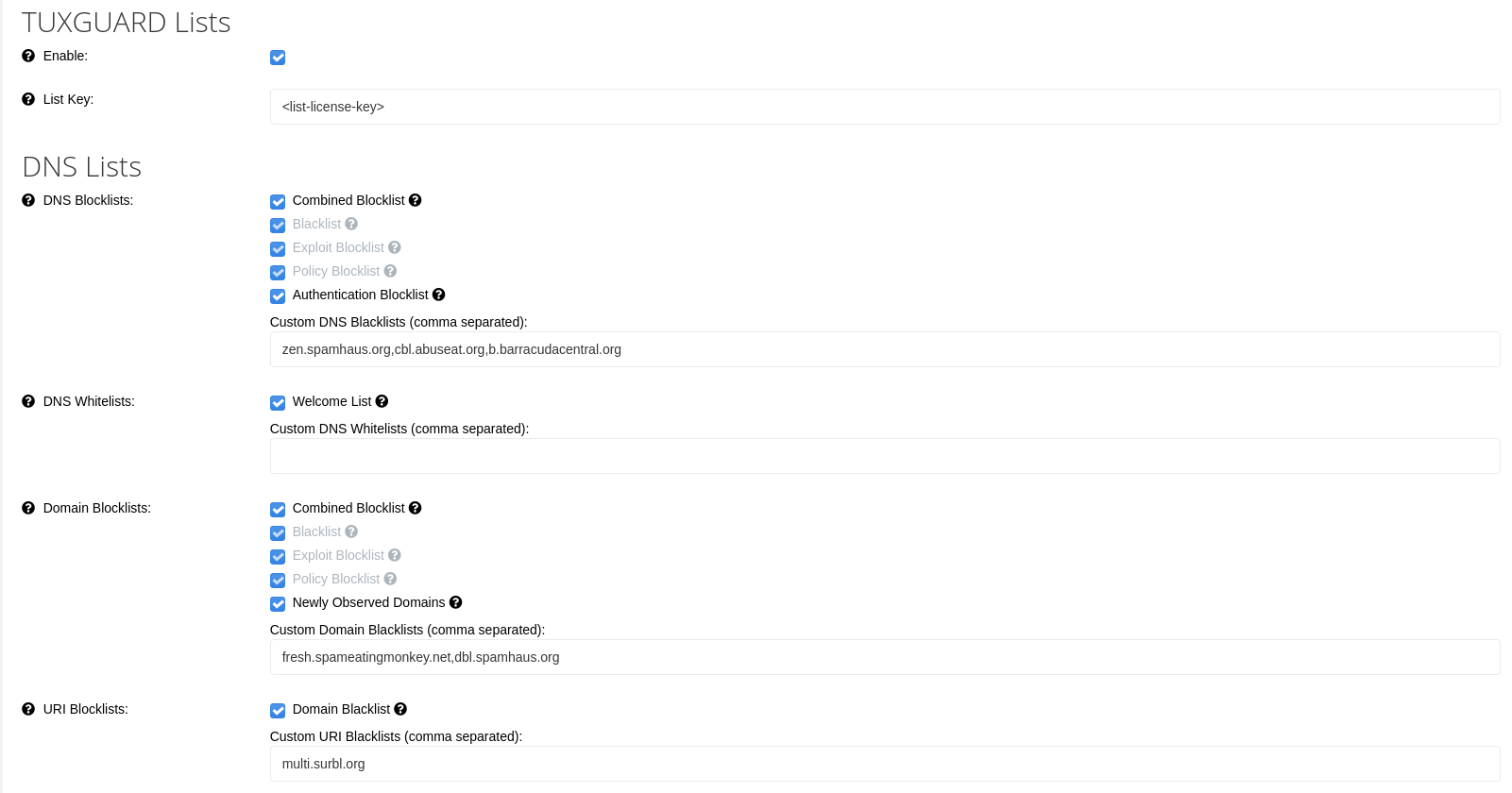
Enable
Enables TUXGUARD blocklists
List Key
The license key to be used with TUXGUARD blocklists (needs to be entered when previous checkbox is toggled)
DNS Lists
These use DNS lookups to see if an IP address or Domain name is listed.
The result from a DNS list lookup must be in the 127.0.0.0/8 range except for 127.0.0.1 otherwise the result is ignored and the list disabled from further queries.
If a list returns a lookup timeout then the listis automatically disabled and retested every 5 minutes to see if it is working again to prevent the lookups from adversely affecting performance.
DNS Blacklists
Looks up the connecting IP address on the specified lists and rejects the message if the host is listed.
If TUXGUARD lists are enabled, the following checkboxes are available:
- Combined Blocklist: aggregated list from Blacklist, Exploit Blocklist and Policy Blocklist
- Blacklist: IP Spam Blocklist
- Exploit Blocklist: IP Exploit blocklist listing IPs that show suspicious behaviour
- Policy Blocklist: IP Policy Blocklist listing IP addresses that should not connect directly
- Authentication Blocklist: a subset of the Exploit Blocklist with shorter listing duration to prevent DHCP-related false-positives
The recommended custom lists to use here are:
- zen.spamhaus.org
- cbl.abuseat.org
- b.barracudacentral.org
Note
zen.spamhaus.org is not free for commercial use, you must pay for a feed or the query service if you wish to use it for an extended period.
DNS Whitelists
Looks up the connecting IP address on the specified lists and whitelists the message through all pre-DATA tests only, post-DATA content checks are still run and the message can still be rejected.
If TUXGUARD lists are enabled, the following checkboxes are available:
- Welcome List: an aggregated list of multiple whitelist sources (including DNSWL)
The recommended custom list to use here: list.dnswl.org.
Note
DNSWL is not free for commercial use, you must pay for a feed if you wish to use it for an extended period.
It is however included in the TUXGUARD Welcome List
Domain Blacklists
Looks up the full domain name of any rDNS names, HELO domain, envelope from domain, Message-ID header domain or any domains found within the message body and rejects the message if the domain is listed.
If TUXGUARD lists are enabled, the following checkboxes are available:
- Combined Blocklist: aggregated list from Blacklist, Exploit Blocklist and Policy Blocklist
- Blacklist: IP Spam Blocklist
- Exploit Blocklist: IP Exploit blocklist listing IPs that show suspicious behaviour
- Policy Blocklist: IP Policy Blocklist listing IP addresses that should not connect directly
- Newly Observed Domains: a list of newly observed domains which is useful for scoring
The recommended custom lists to use here:
- dbl.spamhaus.org
- fresh.spameatingmonkey.net
Note
Spamhaus is not free for commercial use, you must pay for a feed or the query service if you wish to use it for an extended period.
URI Blacklists
Looks up the domain name stripped to the organization boundary of any domains found in the message body only and rejects the message if the domain is listed.
If TUXGUARD lists are enabled, the following checkboxes are available:
- Domain Blacklist: list of domains and IP addresses found in message body
The recommended custom lists to use here:
- black.uribl.com
- multi.surbl.org
Note
URIBL and SURBL are not free for commercial use, you must pay for a feed or the query service if you wish to use it for an extended period.
rDNS
Reverse DNS (rDNS) are the hostname(s) that are returned when the IP address of the connecting host is looked up in the DNS. It is standard practice that all email servers that send mail externally to other internet hosts should have rDNS configured.
Many sites (including AOL) will not accept messages from hosts with no rDNS.
Note
To avoid any potential false-positives, rDNS test failures are ignored if sender authentication succeeds
Require rDNS
Require that the connected host must have a rDNS entry. If no rDNS entry is found, the message is rejected, if the lookup returns a timeout or a lookup error, then the message will be deferred and the sender will retry it later.
Reject generic rDNS
Reject rDNS entries that are generic which contain at least two or more octets of the IP address in the name or contain dynamic words (indicating a dynamic IP) but excludes names containing static or business (indicating a static IP or business service).
Reject invalid rDNS domains
Reject rDNS entries which contain top-level domains (TLDs) that are not valid. Common TLDs used on internal networks: .local, .lan and .corp are automatically excluded from these checks.
EHLO/HELO
HELO/EHLO is sent as the first command that should be sent after connection (once the banner is received).
HELO is used for older-style SMTP connections and EHLO is for Extended ESMTP connections and the response of EHLO tells the remote client which SMTP extensions are supported (e.g. STARTTLS, AUTH, SIZE etc.).
Note
To avoid any potential false-positives, HELO/EHLO test failures are ignored if sender authentication succeeds
Require valid hostname
The RFC states that a fully-qualified hostname (not a domain name) should be sent as the HELO/EHLO argument and enabling this option requires this.
If the sender fails to send it in this way, the connection is rejected.
Reject hosts that send mismatched HELO
HELO/EHLO can also be used multiple times within a connection (to reset transaction state) and this option ensures that the host always sends the same arguments as it is reasonably common for poorly written spam cannon software to attempt to cycle through different HELO names each time it sends them. With this option enabled any message that is sent with the HELO/EHLO in this format will be rejected.
Reject bare IP addresses
The RFC states that IP address should always be sent in literal format e.g. [1.2.3.4] or [dead::beef].
Enabling this option enforces this and any message that is sent using a bare IP address will be rejected
Reject mismatched IP literals
Reject messages from connections where the IP literal sent does not match that actual connection IP address.
If the connection IP is an RFC1918 address, then this option is ignored.
Reject dynamic
Reject HELO/EHLOs that contain all or part of the IP address of the connected host (e.g. they look like generic rDNS names).
Bounce Messages
Bounce messages are administrative messages sent using a special null envelope sender address to ensure that should delivery fail another bounce message will not be set.
They are used to tell a sender if a previously accepted message was rejected when delivery was attempted or that a message is delayed and is still in the queue and for out-of-office replies and vacation notices.
They are essential to the working of SMTP and disabling them entirely will cause issues where your senders think that messages have been delivered when in fact they were not. Typically, users will see them when they have a typo in an email address or send a message to a mailbox that doesn’t exist or has been deleted.
One of the main issues with bounce messages is that poorly configured sites will send bounce messages to mail from spoofed senders (e.g. where spam is sent using someone else’s email address as the return address) and depending on how many messages were sent - the number of bounce messages received could be significant. This is called Backscatter.
To protect your domains from spoofing in this way you should always configure an SPF record for them.
It won’t completely stop this from happening, but it can significantly reduce the amount of issues this can cause and combined with the options below and with rate-limits for null sender messages per-recipient can mitigate any issues that might arise.
Note
Also see the post-DATA Bounce Messages and Watermarking sections
Single recipient only
Bounce messages should only ever be to a single recipient. When this option is enabled any bounce message with multiple recipients will be rejected.
Enable backscatterer DNSBL list
Query the backscatterer DNSBL list for the connected IP address when they attempt to send a message from the null sender and reject the message if the IP address is listed.
Whilst this can be useful if you are under a Backscatter attack, it can still cause valid bounces to be rejected from hosts that are listed, so it should only be used when necessary.
Reject all
When enabled, this will reject all bounce messages.
Note
This should only be used in exceptional circumstances.
Sender Policy Framework (SPF)
SPF is a method to prevent sender address forgery and protects the envelope sender address, which is used for the delivery of messages. It allows the owner of a domain to specify their mail sending policy, e.g. which mail servers they use to send mail from their domain.
The domain owner publishes this information in an SPF record in the domain's DNS zone, and when someone else's mail server receives a message claiming to come from that domain, then the receiving server can check whether the message complies with the domain's stated policy.
See the OpenSPF website for more information and a wizard to set-up SPF for your domains. We recommend that all domains publish an SPF record as it is also useful as a whitelisting mechanism.
SPF checks are always run for every message and is used as part of Sender Authentication heuristics
Enabled
Enabling this option allows TUXGUARD Mail Gateway to reject messages where the SPF check returns Fail e.g. the domain owner specified that mail from their domain should not come from the connected IP address.
Sender Authentication
Sender Authentication uses heuristics to determine whether the connected IP address sending a message is related to the domain name that the message is reported to be from.
If an SPF record is published by the domain and it is not overly broad (e.g. does include large IP ranges or have +all result) then the SPF result is used, otherwise another set of DNS checks are run to determine this.
Sender authentication can be used for whitelisting, blacklisting and is used by TUXGUARD Mail Gateway internally to skip some stricter tests that can sometimes cause false-positives at some sites
Skip rDNS/HELO rejections
Skip rDNS and HELO/EHLO check failures when Sender Authentication succeeds.
Greylisting
Greylisting intentionally defers messages from unknown servers for a short period of time to prove that server (or group of servers) correctly retries the message again later (this is a core requirement of a mail server). This delay also greatly helps the effectiveness of DNS and URI blacklists due to the inherent lag time between spam detection and DNS listings.
Configuration Options:
Enable or Disable greylisting globally
Time
The amount of time in seconds that a host should be greylisted for. If further the host sends further retries during this period then they are greylisted again. The default and recommended value for this is 850 seconds. This is because many sites have a default retry period of 15 minutes and this ensures that these hosts are only ever deferred once.
Fail TTL
The amount of time to keep a greylisting key in the cache before it is automatically expired (in seconds).
The default and recommended value is 90000 seconds which is 25 hours which allows a host with a 24 hour retry interval to pass greylisting.
Pass TTL
The amount of time to keep a greylist pass key in the cache since it was last used before it is expired (in seconds). The default is 3628800 seconds (42 days).
Miscellaneous
Single domain per session
A single SMTP session can create multiple transaction which can result in a messages being accepted.
When enabled, this option only allows multiple transactions where the sender domain name is identical to the previous transaction or if the domain name and host can be authenticated using Sender Authentication, otherwise the messages will be deferred to force the host to try again later. This can help slow down messages being injected from compromised hosts.