Mail Rules
Mail Rules are key/value lookup tables that TUXGUARD Mail Gateway uses to implement nearly all of its functionality.
At each stage of an SMTP transaction, lookups are made by key into the mail rules and the results of these lookups are stored and used by TUXGUARD Mail Gateway to implement various parts of its functionality.
Each lookup key prefixes the stage that it is looked up at e.g. connect, helo, from, to and body along with the item being looked up e.g an IP address, host/domain name or email address.
The lookup item is then stripped by logical piece from most specific to least specific, piece by piece and looked up again until the lookup is empty.
Note
The lookup keys are always lowercase, but the values are case-sensitive, so they must be entered as shown
Adding Mail Rules
The GUI offers a guided interface allowing creation of new mail rules.
The first step consists of creating a new mapping using one or a combination of lookup keys:
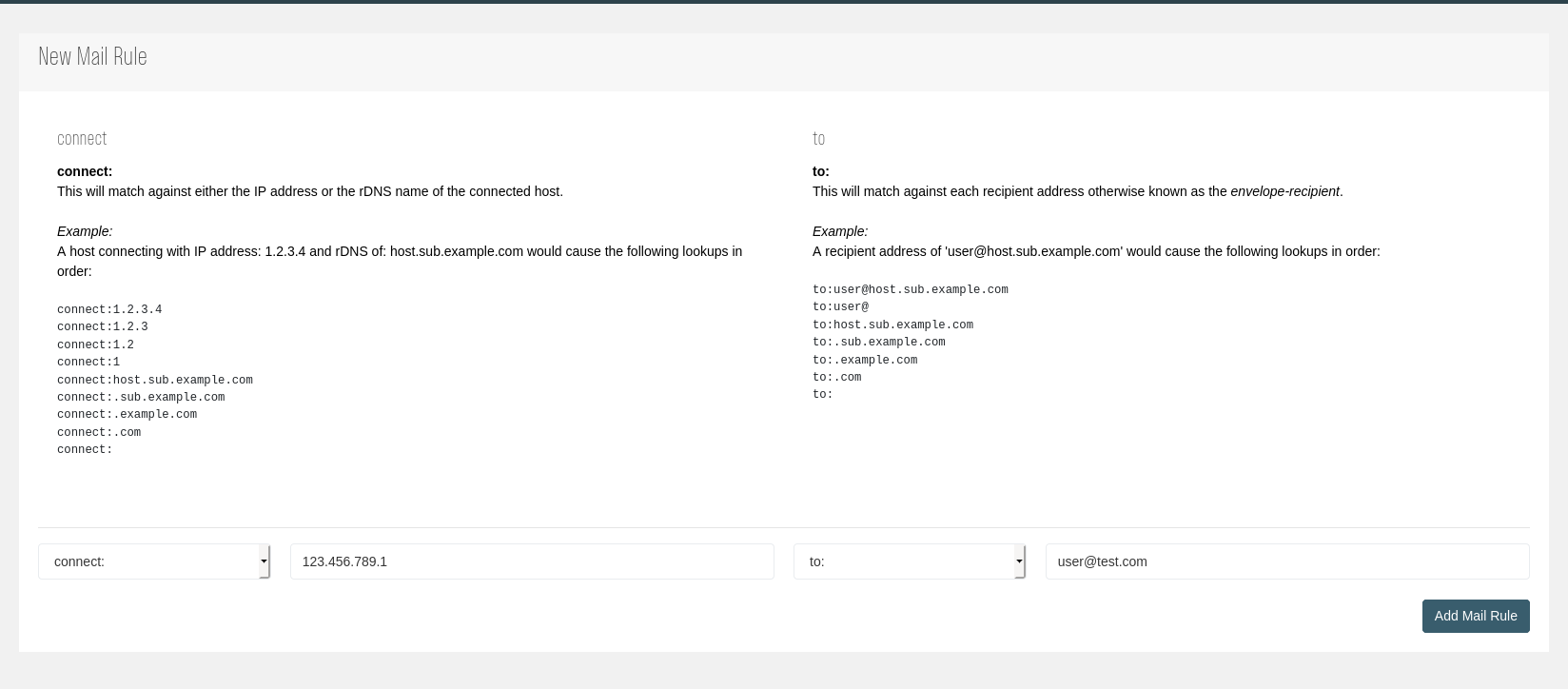
After creating a new Mail Rule, one or multiple subkeys can be defined:

Already defined subkeys belonging to a mail rule can be edited inside the same view or inside the listing table:
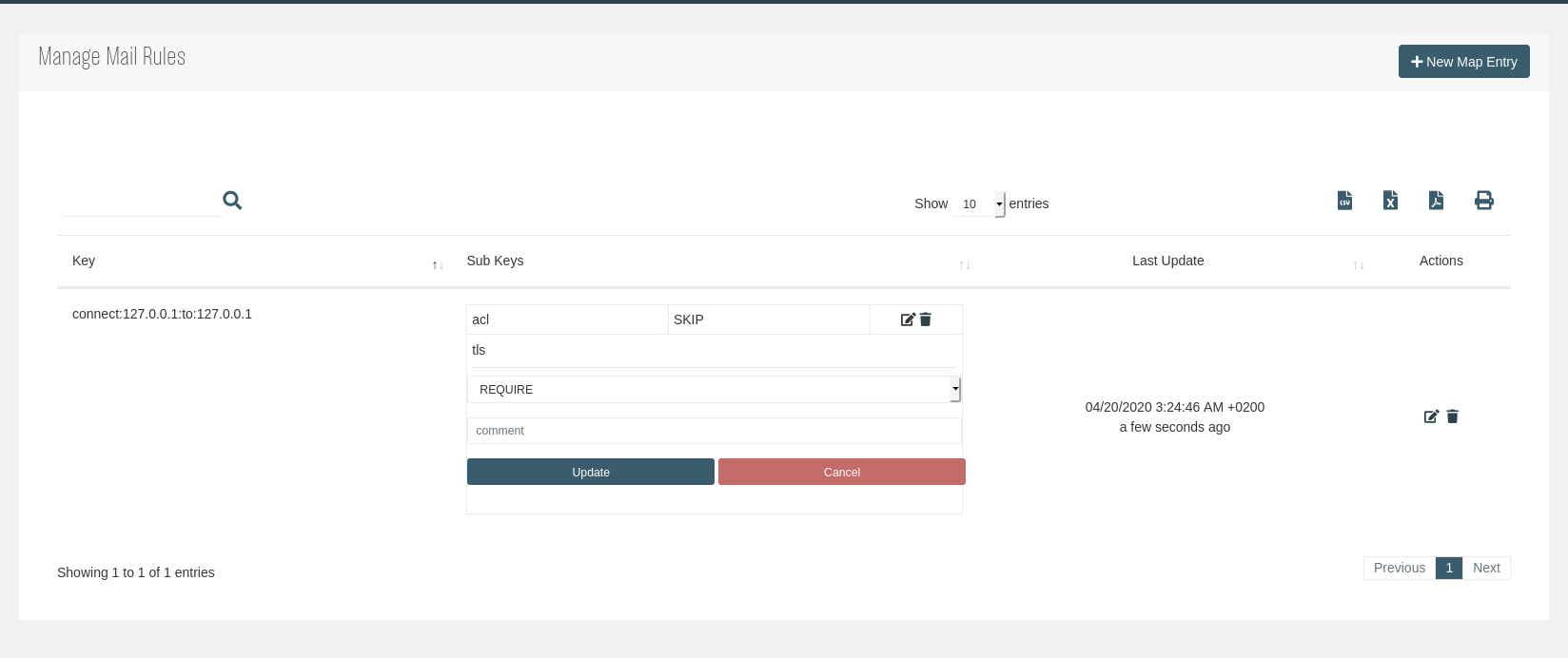
In case multiple subkeys have to be edited, the previous edit view can be accessed using the Edit ( ) action.
Lookup Order
Connect
These lookup the IP address and the rDNS hostname if it is available and it can be forward confirmed (FCrDNS). The FCrDNS requirement is to prevent spoofing.
Host connected over IPv6
Lookups start with the fully expanded IPv6 address and then strip one octet from the right until there are no more octets left.
connect:ip:ip:ip:ip:ip:ip:ip:ip
connect:ip:ip:ip:ip:ip:ip:ip
connect:ip:ip:ip:ip:ip:ip
connect:ip:ip:ip:ip:ip
connect:ip:ip:ip:ip
connect:ip:ip:ip
connect:ip:ip
connect:ip
Host connected over IPv4
The lookups start with the full IPv4 address and then strip one octet from the right until there are no more octets left:
connect:ip:ip:ip:ip
connect:ip:ip:ip
connect:ip:ip
connect:ip
IP address has a rDNS entry that can be forward confirmed (FCrDNS)
The lookups start with the full hostname and then strip the left-most label but leaving the leading dot, so to only match subdomains of that label.
connect: fcrdns.host.sub.sub.domain.tld
connect:.host.sub.sub.domain.tld
connect:.sub.sub.domain.tld
connect:.sub.domain.tld
connect:.domain.tld
connect:.tld
Last lookup is always blank and is used for defaults
connect:
HELO
These lookup the HELO or EHLO argument.
If the HELO or EHLO contains a hostname or domain label, it is stripped in the same way as connect:
The lookups start with the full hostname and then strip the left-most label, leaving the leading dot
helo:host.sub.sub.domain.tld
helo:.sub.sub.domain.tld
helo:.sub.domain.tld
helo:.domain.tld
helo:.tld
If an IPv4 literal is sent, then it is not stripped
helo:[ip.ip.ip.ip]
If an IPv6 literal is sent, then it is not stripped
helo:[ip:ip:ip:ip:ip:ip:ip:ip]
The last lookup is always blank and is used for defaults.
From
These lookup the MAIL FROM argument e.g. the envelope sender or envelope-from address.
This is where it starts to get more complicated because TUXGUARD Mail Gateway will combine each connect: lookup (except the bare connect: lookup) with each from: lookup as shown below (we call these combo tags) with an additional connect: lookup added at the top of the connect: lookup list.
These are:
connect:__auth__
OR
connect:__noauth__
Where __auth__ is used when the IP address has passed Sender Authentication and __noauth__ when not.
This is very useful when whitelisting or blacklisting based on the sender or sender domain.
Once each combination has been looked-up, the 'bare' from: lookups are made.
from:user+detail@host.sub.domain.tld  (only if + addressing is used)
from:user@host.sub.sub.domain.tld
from:user+detail@ (only if + addressing is used)
from:user@
from:<> (only if sender is null)
from:host.sub.sub.domain.tld
from:.sub.sub.domain.tld
from:.sub.domain.tld
from:.domain.tld
from:.tld
from:
To
These lookup the RCPT TO argument e.g. the envelope recipient or envelope-to address.
As with the from: lookups above each connect: lookup (except the bare connect: lookup) will be combined with each to: lookup as shown below, once that is complete the same thing is done with the from: lookups and then finally the ‘bare’ to: lookups are made as below:
to:user+detail@host.sub.domain.tld  (only if + addressing is used)
to:user@host.sub.sub.domain.tld
to:user+detail@ (only if + addressing is used)
to:user@
to:<> (only if sender is null)
to:host.sub.sub.domain.tld
to:.sub.sub.domain.tld
to:.sub.domain.tld
to:.domain.tld
to:.tld
to:
Body
Body lookups are made for each URI found within a message and are used to blacklist or to skip the URI DNS lookups (Domain Blacklists and URI Blacklists) for specific domains.
Note
body: lookups do not include implicit sub-domain lookups, so body:tuxguard.com would match tuxguard.com and all sub-domains of tuxguard.com
Subkeys
ACL
Access Control Lists (ACL) are used for whitelisting, blacklisting and other administrative functions such as deferring or discarding messages based on their connection attributes.
ACL are implemented using the acl sub-key in the Maps and can be used at any stage of the SMTP transaction: connect, helo, from, to, body and can return the following values:
Important
These values are case-sensitive!
Note
body: keys may only return OK (skip the URI lookup) or REJECT (reject the message), all other values are ignored.
| Value | Description |
|---|---|
| Skip | Skip any further ACL lookups |
| OK | Whitelist through all checks except Anti-Virus and Attachment checks |
| CONTENT | Whitelist through all pre-DATA checks |
| AUTH SPF-PASS | Same as OK, except it is only applied if the sending host can be authenticated against the domain it is sending from (Sender Authentication) |
| REJECT | Blacklist. Deferred until each recipient is known so that other whitelist entires can be applied first (such as recipient whitelists). You can optionally specify a custom rejection message using REJECT:"custom message" |
| IREJECT | Instant Blacklist. An SMTP rejection is immediately returned. You can optionally specify a custom rejection message using IREJECT:"custom message". Subsequent lookups that may return a whitelist result are not run, so use with care. |
| TEMPFAIL | Defer with an SMTP temporary failure message. Deferred until each recipeint is known so that other whitelist entries can be applied first. You can optionally specify a custom rejection message using TEMPFAIL:"custom message". |
| ITEMPFAIL | Instant Defer. An SMTP temporary failure is immediately returned. You can optionally specify a custom rejection message using ITEMPFAIL:"custom message" |
| DISCARD | Prevent all checks except Anti-Virus and Attachment checks from running and pretend to accept the message, but throw it away. Use with extreme caution! |
Pattern Lists
You can also use Pattern Lists where more fine grained control is required.
Pattern lists return one of two results, one where the pattern list matches and a default value if it does not

The format used for this is <pattern><result_if_match><default_result>.
The following pattern lists are supported in ACLs:
- RegExp: Regular expression with forward slashes as delimiters,
e.g./regexp to match/OK REJECT - Simple: Simple wildcard match with exclamation marks as delimiters. Supported wildcards are
?(match single character) or*(match any character),
e.g.!*match*!OK REJECT - CIDR: CIDR match. This is only used for connect: lookups that match an IP address. Delimiters are square brackets.
As the key lookups do not allow for classless addressing, you must use a key that matches a class that is larger than the CIDR you are trying to match,
e.g.:connect:10.100 acl [10.100.1.0/20]OK REJECT
If an ACL matches, a message header X-Haraka-AccessMap: is inserted into the message which shows the matching mail rule key.
TLS
Using the mail rules, you can enforce TLS and require it for certain connections, domains or recipients or you can prevent the STARTTLS extension from being advertised to specific hosts should they have a bad configuration that prevents TLS from being negotiated.
Using the map sub-key tls you can apply the following values:
| Value | Description |
|---|---|
| SKIP | Do not advertise TLS |
| REQUIRE | Require TLS. Message will be rejected if the session is not encrypted |
| VERIFY | Require TLS and require the certificate to pass verification. The message will be rejected otherwise |
Concurrent Connection Limits
Using the mail rule subkey concurrent you can implement concurrent connection limits with the value being the number of concurrent connections allowed per IP address.
If the value is <= 0, then the limit is disabled for any connection that matches the key.
Note
Only connect: mail rules are checked for concurrency limits.
Once the concurrency limit is reached, any subsequent connections will be tar-pitted for 30 seconds before being deferred with the message “concurrent connection limit (\<limit>) exceeded”.
Note
The concurrency limit is counted and applied per TUXGUARD Mail Gateway worker and is not cluster-wide.
To disable Concurrent Connection Limits set the concurrent sub key to -1.
Connection Rate Limits
Using the subkey rate you can apply connection rate limits with the value being the number of connections allowed per minute, per IP address.
Note
Only connect: mail rules are checked for connection rate limits.
Once the connection rate limit is reached, any subsequent connections will be tarpitted for 30 seconds before being deferred with the message “connection rate limit exceeded”.
To disable Connection Rate Limits listing set the rate subkey to -1.
Greylist TTL
Using the subkey grey you can override the default greylist TTL by host or by destination domain.
To disable grey listing set the grey subkey to -1.
Note
Only connect: and to: map entries are checked.
Null Sender Rate Limits
Using the subkey null-rate you can configure a rate limit for messages with a null sender (Bounce messages).
The value is specified as number of messages with an optional time period and metric. e.g. 5/1d (5 messages in one day).
If the time period is not supplied, then it defaults to 60 seconds and if the metric is not supplied then it defaults to seconds.
The following metrics are allowed:
| Value | Description |
|---|---|
| s | Seconds (default) |
| m | Minutes |
| h | Hours |
| d | Days |
| w | Weeks |
Note
Only to: mail rules are checked for null sender rate limits.
If the specified rate is exceeded, then all further recipients are deferred by sending an SMTP temporary error, which means the sending server will queue the message and retry it again periodically.
This facility does not reject messages, it delays them to manage the rate of messages.
Message Rate Limits
Using the subkey msg-limit you can configure a message rate limit.
The value is specified as number of recipients with an optional time period and metric. e.g. 5/1d (5 recipients in one day). If the time period is not supplied, then it defaults to 60 seconds and if the metric is not supplied then it defaults to seconds.
The following metrics are allowed (not case-sensitive): (same as Null Sender Rate Limits).
If the specified rate is exceeded, then all further recipients are deferred by sending an SMTP temporary error, which means the sending server will queue the message and retry it again periodically.
This facility does not reject messages, it delays them to manage the rate of messages.
You may use to:, from: and connect: mail rules, but note that they are looked up in this order (e.g. to, from, connect) which is the reverse of things like ACLs.
Additionally, the mail rule type denotes where the limit is applied:
e.g. to: = recipient, from: = sender, connect: = host IP address.
For example:
to:test@tuxguard.com msg-limit 5/1d
This would limit the recipient test@tuxguard.com to a maximum of 5 messages per day whereas
connect: msg-limit 300/1d
would set the default limit for each unique IP address to a maximum of 300 valid recipients per day.
You could then use more specific mail rules to raise or lower the limit.
Message Size Limits
Using the subkey length you can configure custom message size limits up to the Maximum Message Size.
The value is the maximum size with an optional metric which defaults to bytes if not specified.
The following metrics are allowed (not case-sensitive): k (Kilobytes), m (Megabytes), g (Gigabytes)
Note
If you supply an invalid metric, an error will be written to the syslog and no limit will be applied.
All key types except body: are supported although the size limits are checked in reverse order (e.g. to, from, connect) as that is the most specific order in this case.
If a message exceeds the configured size limit, then the message is rejected with the message:
message size of <size> bytes exceeds limit of <limit> bytes
Note
In ESMTP, the sender can report the message size before the message data is sent.
However, some servers cannot do this and in these cases the limit must be applied after the message is received.
In this case and if the message has multiple recipients, then any recipient limits are only looked up if all recipients have a common domain name, otherwise they are skipped entirely
Relay
Using the subkey relay, you can allow specific hosts relay permissions.
Only the connect: map entries are looked up (so it has to match an IP address or confirmed rDNS name).
The value of the lookup can be either true or strict, where strict only allows a host to send email with an envelope-from domain matching any domain that you have defined in ‘Domains’.
This is to prevent a hacked account or internal machine from sending mail that is not from one of your local domains.
Blind Carbon Copy
Using the subkey bcc, you can force TUXGUARD Mail Gateway to add additional recipients to a
message when a key matches.
The value should be a list of recipients separated by comma, space or semicolon.
Two variables are available, $1 will be expanded to the local part and $2 the host/domain part
TODO: example
No List Traffic
This is enabled on a per-recipient basis by creating an ACL for the recipient with the subkey no_list_traffic with a value of true or strict to enable a stricter mode (described below). It will only work on map entries with a to: match.
When enabled, this looks for messages from mailing lists to recipients that either never send mail out directly (e.g. shared mailboxes, role accounts and the like) or that should otherwise never receive bulk mailing list traffic as you will not subscribe them to any lists.
It is most useful for "role" mailboxes like info@ or support@ and can prevent a considerable amount of junk whilst still allowing person-to-person e-mail.
It looks for the following:
- Messages to a single recipient only
- Envelope From matching
noreply@orbounce@ - Envelope From a VERP address (e.g. the from address contains the recipient address)
- A
List-Unsubscribe,List-IDorX-Requests-Toheader - A Precedence header of
list - A blank, missing or
undisclosed-recipientsTo:header - An X-Mailer header of ‘PHPMailer’
- The
To:orCc:header does not contain the envelope recipient address - The
To:orCc:header contains more than 11 recipients. - The
From:address does not match the Envelope-From
strict mode adds additional text checks of the body of the message:
- An HTML anchor that contains
/u/in the URL - The text
“This is an advertisement” - unsub, unsubscribe, remove or removeme followed by a period (
.) to catch any HTML links containing this in the URL - Text to the effect of:
“reply to this message with the subject of N”and variants - Text to the effect of:
“prevent further messages”and variants - The text
“do not reply to this”followed by“mail”or“message” - Text to the effect of:
“this is an auto-generated message”and variants - The text
“Unsubscribe” - The text
“If you no longer wish to receive” - Text to the effect of:
“You can opt-out by”and variants - Text to the effect of:
“You are receiving this newsletter because”and variants
If any of these conditions is met, then the message will be rejected with the message “This
recipient does not accept messages from mailing lists”